Scrapbooking for Beginners
We will walk you through the Scrapbooking Basics, step-by-step
Step #2 - Determine Your Colors
The Quick Start Guide of Scrapbooking for Beginners 1. Gather
Related Photos.
2. Determine the Predominate Color.3. Determine
Theme or Context.
4. Pick papers - Based on your colors, theme or content.
5. Collect your tools.
6. Matte the photos -- if you want to.
7. Test fit the photos to the page size and adhere to the layouts.
8. Add Embellishments or other goodies -- if you have them or want them.
9. Add the Journaling or save it for later.
10. Get your scrapbooking photo album and load the pages in your album and show off...
Step #2. Pick Your Colors Based on Your Photos



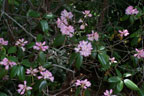


Here is an assortment of photos from Table Rock Park in South Carolina. As you can see from these, the colors are mostly greens and blues, with a little pink in the one with the flowers.
And as luck would have it, only one in the bunch is a vertical photo.
You would think with my many years of experience with scrapbooking, I would remember to take more of these vertical shots! (I will show you a quick way to work around that in
Step #7 - Test Fitting Your Layouts
and also on the
Photo Cropping
page.
With Scrapbooking for Beginners. I would suggest picking some colors for your background papers and embellishments that will go with the photo colors. That makes your photos look better so they will not clash, color wise, with the papers.
I did an entire scrapbook of our Camping Trip to Table Rock State Park in South Carolina.
For some of the photos I picked some shades of green and blue. For some layouts I used gray and blue - those photos were shots of the landscape and the grey made a nice background for the haze in the sky. For a number of other layouts I used browns and tans. I used Pinks with Brown for the photos with the Pink Flowers. One set I even used shades of Pinks as several of us wore pink that day. It's just a matter of choice.
The basic and most simple point in Scrapbooking for Beginners, is not to have the color in your background clash with and spoil the color in your photos. You want to show off the photos in their best light.
You can click here to check out all the Table Rock Scrapbook Layouts.
Tablerock Scrapbook Layouts.
White is a Color!
So is Off-White!
So is Black, for that matter.
All that being said about color. Now there is nothing in the so-called "manual" that says you have to use a background color. All the scrapbooks you purchase these days come preloaded with white or off-white background paper that you are certainly free to use - after all, everything goes with white or off-white.
Scrapbooking for Beginners Scrapbook advice Tip: Start with white, it will make your first attempt much easier
Remember the Color Choice is Yours!
So for scrapbooking for beginners, we will show the progression of the page or layout construction using a colored background and will show both the colored and white backgrounds as a final so you can see the difference.
As you look through the many layouts posted on this website, I am guessing that you will see more layouts where I have used blue. Maybe it's because a lot of my photos are outside and I am trying to match the sky, or maybe it's just that I think light blue looks better with a majority of things. My second most used color is probablY shades of brown - which is my least favorite of colors, but it show things off well.
So, now you ask, how do I pick colors that actually go with my Photos?!
Lot's of us are
color challenged. Not to worry, there is a handy little gizmo called a
color wheel and there are a number of different ways to do color mixing and matching.
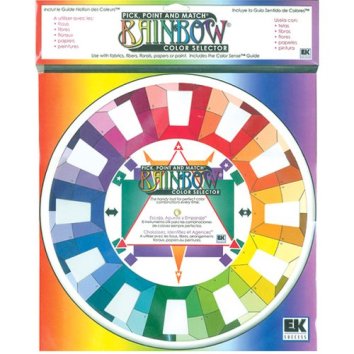
This is the one that I have. It's made by EK Success and is available at many stores that sell scrapbooking supplies. It's also available in the
Color Wheel Store at the bottom of this page.
They come with directions on how to use them and how to mix and match colors and the process is very easy to understand.
Color Schemes
So what is a Color Scheme? Basically, any colors that are used in a piece of art would be the Color Scheme for that art piece. Even the white with black writing of a book or newspaper, is considered a Color Scheme. Very familiar, used often - can be formal like a wedding or older like old black and white photos.
Here are a few Scrapbooking for Beginners ideas for you to think about when you are thinking about color.
Monochromatic - Monochromatic Color Schemes would contain several shades of the same color family. For Example: Several Shades of Blue - normally creating a sophisticated and more formal look.
Analogous - Analogous Colors are next to each other on the Color Wheel. For instance, Red is next to Orange, but Red is also next to Violet on the other side of the wheel.
Complimentary - Complimentary Colors are on opposite sides of each other on the color wheel. For instance, Red is opposite Green.
Primary Colors - These are
Red, Blue & Yellow. Secondary Colors - These are the 3 colors that are made from mixing the Primary Colors of Red, Blue & Yellow. Red and Blue make
Purple, Blue and Yellow make
Green, and Yellow and Red make
Orange. The Secondary Colors go nicely with each other. We are just now beginning to see Purple with Orange, especially for Halloween and we have always had a nice paring of Purple and Green.
Tertiary Colors - There are 6 of these colors, made by mix a Primary Color with a Secondary Color, resulting in Red-Orange and Yellow-Orange, Red-Purple, Blue-purple, and Blue-Green & Yellow-Green.
Scrapbooking for Beginners Tip: To read a little more about
Scrapbooking Color Basics and Color Matching and see an on-line color wheel and how it is put together, check out this nice website called
Color Matters
but come on back to Scrapbooking for Beginners for more great information
Or, if you want to get your own Color Wheel or a Book on Color, checkout our Color Wheel and Color Book Store Sponsored by Amazon. Hopefully you will be able to find what you are looking for to fit your needs.
Use the scroll bar at the bottom of the box to scroll to the right and see your Amazon Wish List; search for other products; or see product reviews.
When you purchase from this page, you are actually purchasing from Amazon.com. All orders go through Amazon's secure order server.
If you have any questions, please Contact Us.
Now that you have Picked your Colors ...
Go on to Step #3 - Pick Your Theme
10-Step Quick Start Guide for more great
scrapbook advice tips
Scrapbook Tutorials & Techniques
Leave Scrapbooking for Beginners to Home Page for general Scrapbook Advice


