


|
Scor-it ToolScrapbooking Tools - AdvancedThe Scor-it tool - is great for working with card stock that you wish to fold, impress, emboss or deboss with a straight line, or multiple lines to form designs. You can think of this as a Heavy Duty Bone Folder.
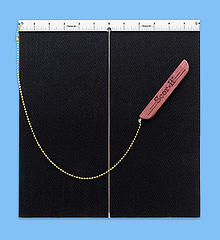
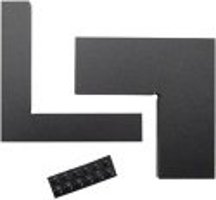
Features of the Scor-ItThis Score it tool is just a little larger than 12 x 12, and will handle a 12 x 12 sheet of paper or card stock very nicely. They also make a 24" and 36" board as well as a smaller mini-board 9" x 6" which is great to take to crops and also for card making. There is a centering ruler bar across the top with the "0" inch mark in the center making it very easy to position your paper for a score down the middle. Down the center is a scoring bar that makes the score as the tool is moved down from the ruler bar. The black portion is a textured rubber matting that will assist with holding your paper or card stock in place while scoring. The scoring tool itself is attachable to either the right or left sides of the ruler bar with a ball chain and there is also a Stop Guide that attaches to the ruler bar that is wonderful if you want to make a number of scores the same distance apart or the same distance from the edge of your paper stock. 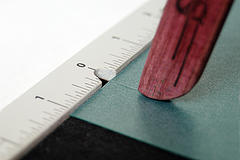
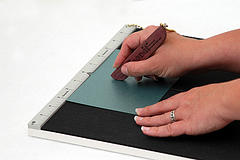
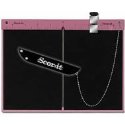
New and Improved Model! The Pink Version of the Scor-it now comes with a new hand held scoring tool made from Stainless Steel and Chrome. The Mini-board is now large enough to accommodate the new A-4 Card Size and the Centering Ruler at the top is now inter-changeable from inches to centimeters with a small Phillips Head Screwdriver.
How to Use the Scor-ItTo use the Scor-it, position the paper stock squarely against the ruler bar at the top. The right side of the paper should be face down and the indented line the tool makes should be the "outside" of the fold. Hold the scoring tool in your dominant hand like you would a pencil, while holding the paper stock in place with your other hand. Position the groove in the hand-held tool over the bar at the top and glide the tool down the paper stock over the bar which will make a score line from the underside. You may want to test a few scores to see how hard you need to press down when scoring. This paper crafting and scrapbooking tool does exactly what it's supposed to do and is quite easy to use for very professional results.
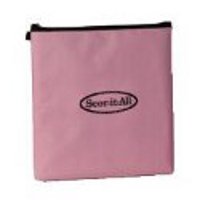
Accessories for the Scor-It ToolCurrently available are padded tote bags for the original 12 inch and mini Score-It in pink and black, both with zipper closure to help keep the Hand Tool and Stop Guide. Cost is about $9.00 for the original 12 inch size and about $5.00 for the mini size.
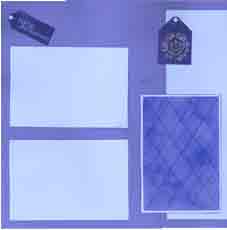
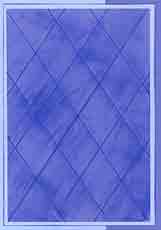
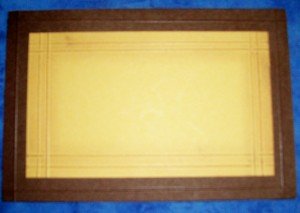
Examples Using the Scor-ItBelow are some examples of what you can do with the Scor-it and then scrapbook layouts using the results. The first blue card on the left was scored every 1 inch, going across and up and down the card. Then the score lines were inked by dragging a blue ink pad directly across the paper. The layout below uses that card. Scrapbook Layout Idea: This will be a matte for a photo or a matte for a journaling block. 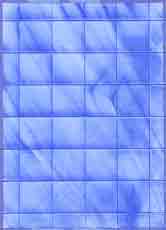

When you purchase from this page, you are actually purchasing from Amazon.com. All orders go through Amazon's secure order server. If you have any questions, please Contact Us. Go back from the Scor-it Tool to see other Scrapbooking Tools
|

Alcohol Ink Rubber & Acrylic Stamps Stencil Information Card Making Tutorials Scrapbooking Don'ts
on our Site?

More Tutorials
Photo Mattes
Cropping Photos
Photo Mosaics
Decorative Craft Scissors
Encaustic Wax Tutorial
Hand Painted Background
Pendant Jewelry Tutorial
Patterned Papers #1
Patterned Papers #2
Chalk
Glimmer Mist
Dicro Fibers
Inking - Direct to Paper
Iris Folding
Bargello
Spirella
Rubber & Acrylic
Stamps
Unmounted Stamps
Stamp Conditioning
Rubber Stamp Embossing
Rubber Stamp Tips & Tricks
Rubber Stamp Store
Michael Strong Stamping
& Embossing Videos
Stencils & Stenciling
Stencil Store
Card Making
Hand Made Cards
Card Making Ideas
Christmas Card Ideas from Michael Strong
Card Making Don'ts
Card Makers Resources
Photography Tips
Things to Avoid
Rubber Stamping Don'ts
Card Making Don'ts
Photography Don'ts
all Your Scrapbook Supplies!

scrapbook-advice.com?